fixing sound issues with vista and windows 7
September 29, 2010Fixing sound issues with Microsoft Vista/Windows 7 – and slow YouTube vids
 For
some unlucky users (including us), there’s been recurring problems with
the sound vanishing from Windows and Windows 7 machines when they’re
woken up from hibernation.
For
some unlucky users (including us), there’s been recurring problems with
the sound vanishing from Windows and Windows 7 machines when they’re
woken up from hibernation.
All our computers run 64 bit versions of Windows, but we understand that users on 32-bit Windows have suffered the same annoying glitch.
Ruddy Realtek
Our problem seemed to be down to the onboard Realtek soundcard which refused to wake up when Windows woke up – which was particularly annoying seeing as we love to blast the office with big tunes through our juicy pair of AudioEngine speakers.
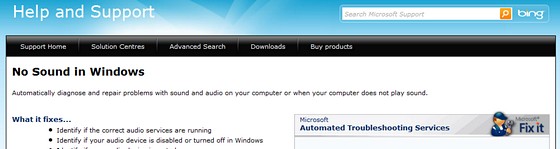
Microsoft help – fail
We’d already spent some time rummaging around Microsoft’s site, and got nowhere with their Troubleshooting Sound Issues page or their ‘No Sound In Windows‘ automated ‘diagnose and repair’ page.
The latter page suggested we do the following:
To access the diagnostics built into your computer:
* Click Start, Control Panel
* In the Control Panel, click System and Security
* In the System and Security window, under Action Center, click Troubleshoot common computer problems
* In the Troubleshoot computer problems window, click a specific task to automatically diagnose and fix a problem. To view more troubleshooters, click a category.
It didn’t work for us, but it may sort out your problems, so please try them first.
Drive on… and off.
Fed up with the sound of silence, we tried downloading the latest drivers, uninstalling, reinstalling, rebooting and doing a little jig around the PC in an attempt to please the Gods of the Soundcard, but still the problem persisted.
In the end, we figured out a bodge that works for us every time, so we thought we’d share it with you (note: we’re using screengrabs from Windows7, but it’s more or less the same for Vista).
We hope it works for you too, because it was driving us mad.
 Step one:
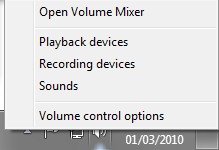
Right click on the speaker icon in your desktop taskbar.
Select ‘sounds’ to open up the dialogue box we’ll be tinkering about it.
The dialogue box has four tabs running along the top – select the ‘Playback’ tab.
Step Two
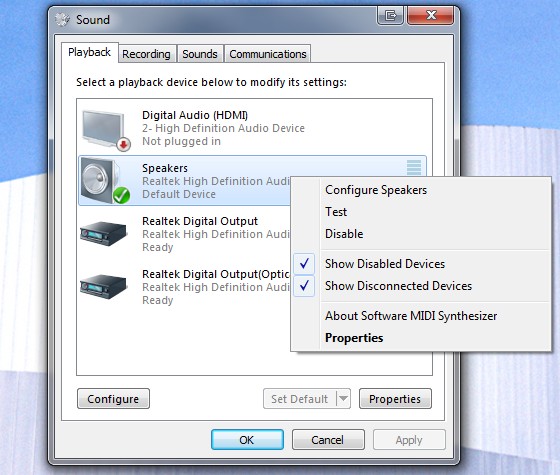
Next, right click on the icon that shows your speakers (the one with the green tick) and you’ll see a pop out menu.
This bit is important: first make sure that you have “Show disabled devices” ticked, and then click ‘disable.’
Then right click again and enable the speakers – and that should be it – sweet sweet music should be flowing forth from your PC.
Good luck!
Posted by shawn white. Posted In : sound issues
